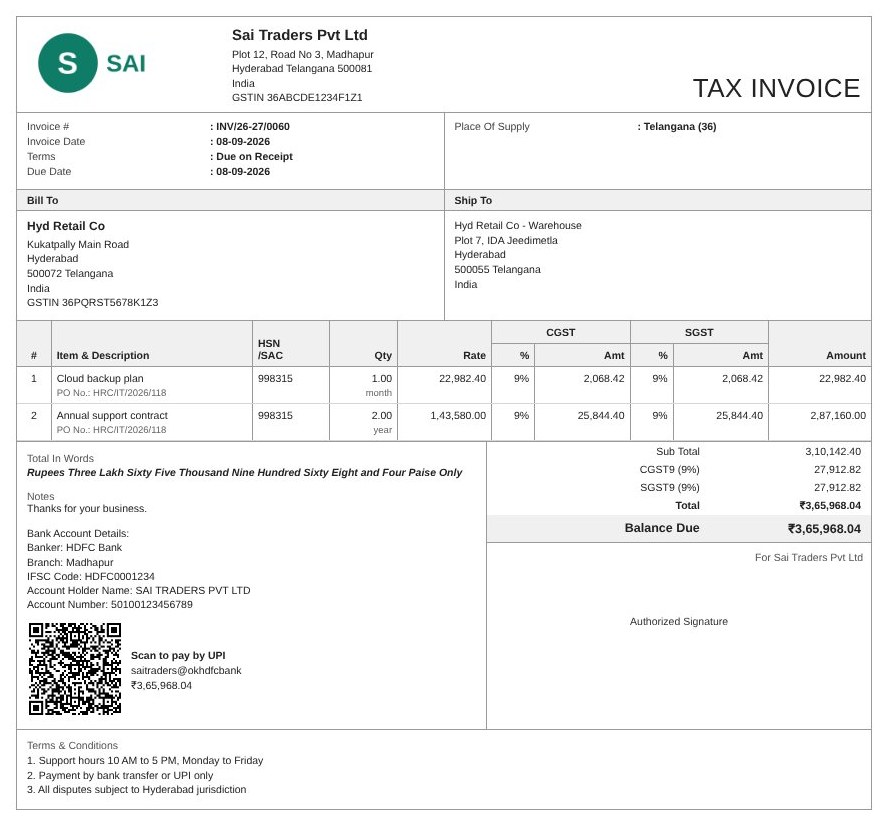
Pick a customer, pick items, click once. GSTable does the CGST/SGST/IGST maths, adds a UPI QR, saves a professional PDF to your Drive and gets it ready for WhatsApp.
Free for 10 invoices every month · No card needed · ₹199/month for unlimited
Sound familiar?
✗ Word & Excel templates
Copy last invoice, change numbers, recheck tax by hand, and hope the GSTIN and totals are right.
✗ Heavy accounting software
Yearly fees, training and a dozen screens just to send a bill. Overkill for most small businesses.
✗ Chasing payments
Typing bank details into WhatsApp, then forgetting who still hasn't paid.
GSTable lives in the Google Sheet you already know, so your list of invoices is just rows you can sort, filter and share.
Features
Picks CGST + SGST/UTGST or IGST from the place of supply. Handles 0–28% rates, round off and total in words (lakh/crore).
Your logo, brand colour, bank details and signatory on a clean A4 PDF that customers and CAs respect.
Customers scan and pay the exact amount from any UPI app. No more “send me your account number”.
A ready-made WhatsApp message with the amount and your UPI ID, plus the PDF to attach.
Pick a customer and their GSTIN, state and address fill in. Pick an item and HSN, rate and GST % fill in.
INV/26-27/0001 style numbers that reset every April and never clash. Quotations and credit notes too.
Monthly or quarterly clients? GSTable reminds you when they are due and creates them for you.
One click sends a polite WhatsApp reminder with the pending amount and a UPI link.
See sales, tax and pending payments at a glance, and hand your CA a month-wise GSTR-1 summary.
How it works
Install GSTable from the Google Workspace Marketplace and open any Google Sheet.
Name, GSTIN, state, bank and UPI ID, logo. GSTable sets up the tabs for you.
New → Invoice, pick customer and items, then Make PDF. Download it or send it on WhatsApp.
Privacy first
Most billing apps keep your customers and sales on their servers. GSTable doesn't. Everything stays in your sheet and your Drive, under your control.
Pricing
Less than ₹7 a day for unlimited invoices.
Upgrade from GSTable → My plan / Upgrade to Pro inside your sheet. Billed monthly via Razorpay (UPI AutoPay or card).
FAQ
Yes. Your invoices, customers and items stay in your own Google Sheet, and PDFs are saved in your own Google Drive. GSTable has no database of your business data. The only thing our server sees is your email address, to check whether you are on the Pro plan.
Each tax invoice includes the details GST rules ask for: your and your customer's GSTIN, a unique serial number per financial year (up to 16 characters), date, HSN/SAC, taxable value, the correct CGST + SGST/UTGST or IGST split based on place of supply, and the total in words. You remain responsible for the data you enter.
Not yet. Businesses whose turnover requires e-invoicing must generate the IRN on the government portal. GSTable is built for the many small businesses below that limit.
No. GSTable is a Google Sheets™ add-on. Install it from the Google Workspace Marketplace and it appears as a menu inside your sheet. It works in any browser on a laptop or desktop. You can share the PDFs from your phone.
You can keep using the sheet, edit data and re-download invoices you already made. To create more invoice PDFs that month, upgrade to Pro, or wait for the count to reset on the 1st of next month.
Pro is billed monthly through Razorpay using UPI AutoPay or a card. You can cancel any time from the link in your Razorpay subscription email. Pro stays active until the end of the month you paid for.
Yes. Share the Google Sheet with your CA as you normally would. The GSTR-1 summary export (Pro) gives them B2B, B2CL, B2CS, credit note, HSN and document totals for a month in one tab.
Install GSTable free. No card, no new software, no learning curve.
